PostSnag Review: Is the $139 Lifetime Deal Legit? (My Take)
PostSnag captures Facebook posts as you scroll. Genuinely useful mechanic, but 181 users and one rating is thin proof. Start free before the $139 lifetime.

One-click capture while you scroll, with no screenshots or manual saving
Brand-new with only 181 users and a single rating
PostSnag in 30 Seconds: The Verdict
PostSnag is a free Chrome extension that captures Facebook posts from any profile, page, creator, or group as you scroll, then sorts and ranks them in a dashboard so you can see what content actually works. It’s genuinely useful for marketers and agencies studying organic Facebook content. The catch: it’s brand-new, with 181 users and a single rating.
👍 What stands out: The AI-ready exports. You capture a competitor’s posts, download them as JSON or Markdown, and paste straight into ChatGPT or Claude for a content breakdown with zero cleanup.
👎 What gives me pause: The social proof is thin. 181 Chrome Web Store users, one 5.0 rating, and homepage testimonials that use stock placeholder avatars. You’re judging this on the mechanic, not the track record.
💡 Bottom line: If you research Facebook content for a living, install the free version today and test the workflow. It costs nothing and takes under a minute. Treat the $139 lifetime deal as a small bet, not a sure thing, because every Facebook capture tool eventually fights Facebook’s next layout change.
Last updated: July 2026
PostSnag vs PostSnap: You’re Probably Searching Two Different Products
PostSnag and PostSnap are completely different products that share almost the same name. PostSnag is a Facebook post-research Chrome extension. PostSnap is a photo-printing and greeting-card service with hundreds of Trustpilot reviews. If you landed on a page full of testimonials about postcards and photo books, you found the wrong tool.
This trips up more people than you’d think. Search “PostSnag review” and Google mixes in results for PostSnap, because the names are one letter apart. Two of the pages competing for this exact search are about the printing service, not the extension.
Quick way to tell them apart:
- PostSnag (this review) captures and analyzes Facebook posts. It lives at postsnag.com and installs from the Chrome Web Store.
- PostSnap prints photos, cards, and canvases. Different company, different purpose, different spelling on the last two letters.
If you wanted the printing service, this isn’t your review. This one covers only the Facebook research extension.
What PostSnag Actually Does
PostSnag turns Facebook browsing into a searchable swipe file. You install the Chrome extension, scroll any profile or group like you normally would, and it captures each post as it appears. No copy-pasting, no screenshots, no manual saving. The posts land in a dashboard where you can sort them by engagement and spot the winners fast.
The whole pitch is killing the guesswork. Instead of scrolling months of a competitor’s timeline by hand trying to remember which posts did well, you capture the lot and rank them by likes, comments, shares, or video plays in a couple of clicks.
Here’s what it pulls from each captured post, per PostSnag’s own documentation:
- Likes, comments, shares, and video plays
- Post type (photo, video, album, text, link, or reel)
- The full caption text
- Exact timestamps
Two features do the heavy lifting. The Discovery feed aggregates the top 1% of outlier posts across every profile you track, so it surfaces what’s overperforming right now without you digging for it. And the AI-ready exports let you download any profile’s data as JSON, Markdown, or Excel, formatted to paste directly into Claude, ChatGPT, or Gemini.
That export is the part worth paying attention to. The capture is convenient, but the real payoff is dumping 30 of a competitor’s best posts into an AI tool and asking it to reverse-engineer the hooks, angles, and formats. If you already run an AI content workflow with a tool like PromptWise, PostSnag feeds it. If you don’t, you’re paying for half the value.
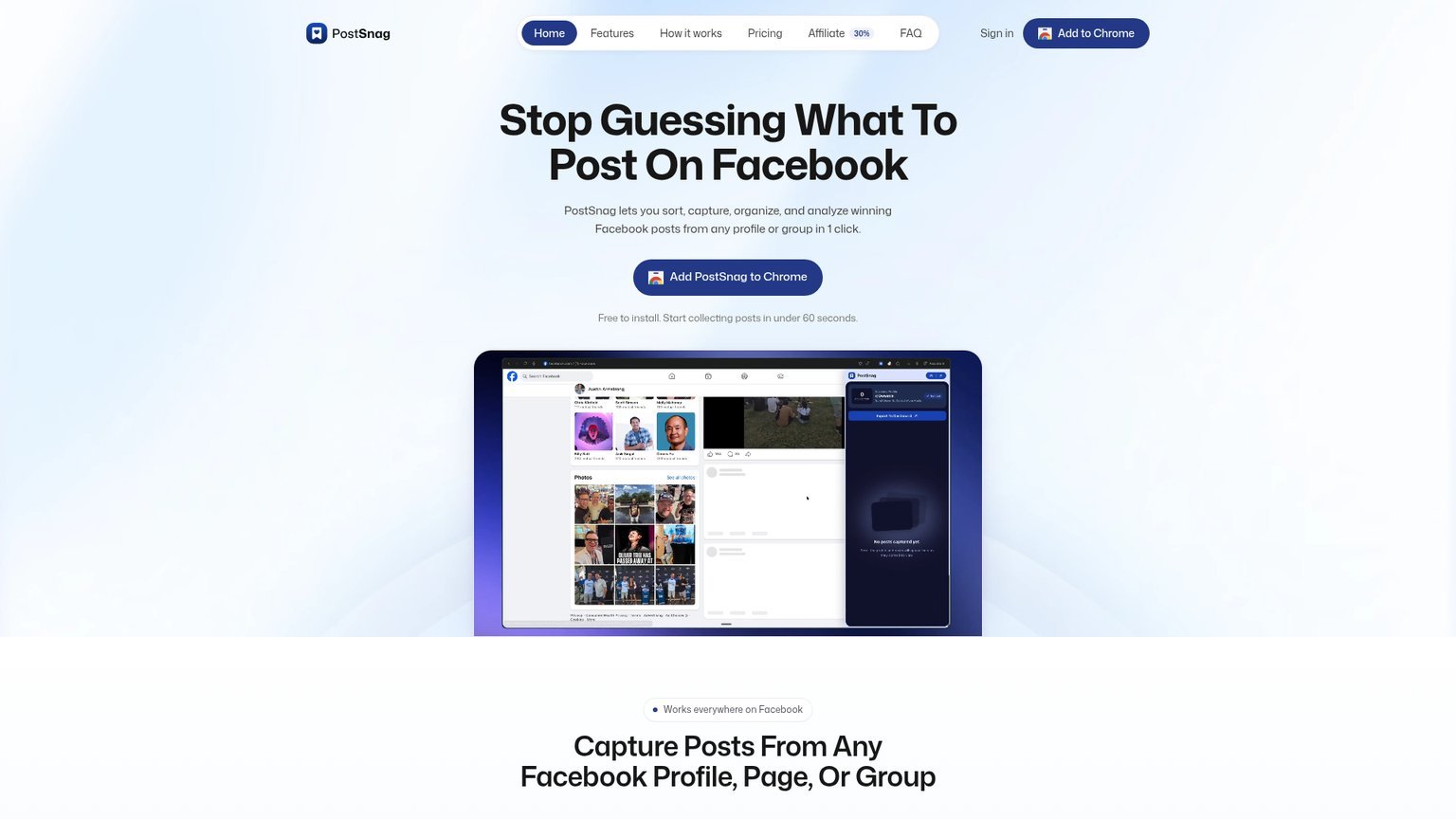
What It Captures From Profiles, Pages, Groups, and Creators
PostSnag works across four types of Facebook sources: personal profiles, business pages, creator accounts, and groups. The one hard limit is access. It only captures what you can already see while logged in, so it can pull any public profile or any group you’re a member of, but it can’t reach a private group you haven’t joined.
Breaking it down by source:
- Personal profiles. Study creators, competitors, and people in your market, and see which of their posts pulled the most engagement without endless scrolling.
- Business pages. Track brand pages and local competitors to learn what offers, topics, and post styles their audience responds to.
- Creator accounts. Follow high-volume creators and find their best hooks, stories, and formats from recent content.
- Facebook Groups. Search any group you can access to find the posts and questions getting the most reactions and comments.
The access rule cuts both ways. It’s the reason PostSnag is lower-risk than a server-side scraper that hits Facebook from the outside, but it’s also its ceiling. If the content you want lives behind a private group wall you’re not inside, no tool that respects your login can grab it, and PostSnag doesn’t pretend otherwise.
PostSnag Pricing: Free vs Pro vs Lifetime
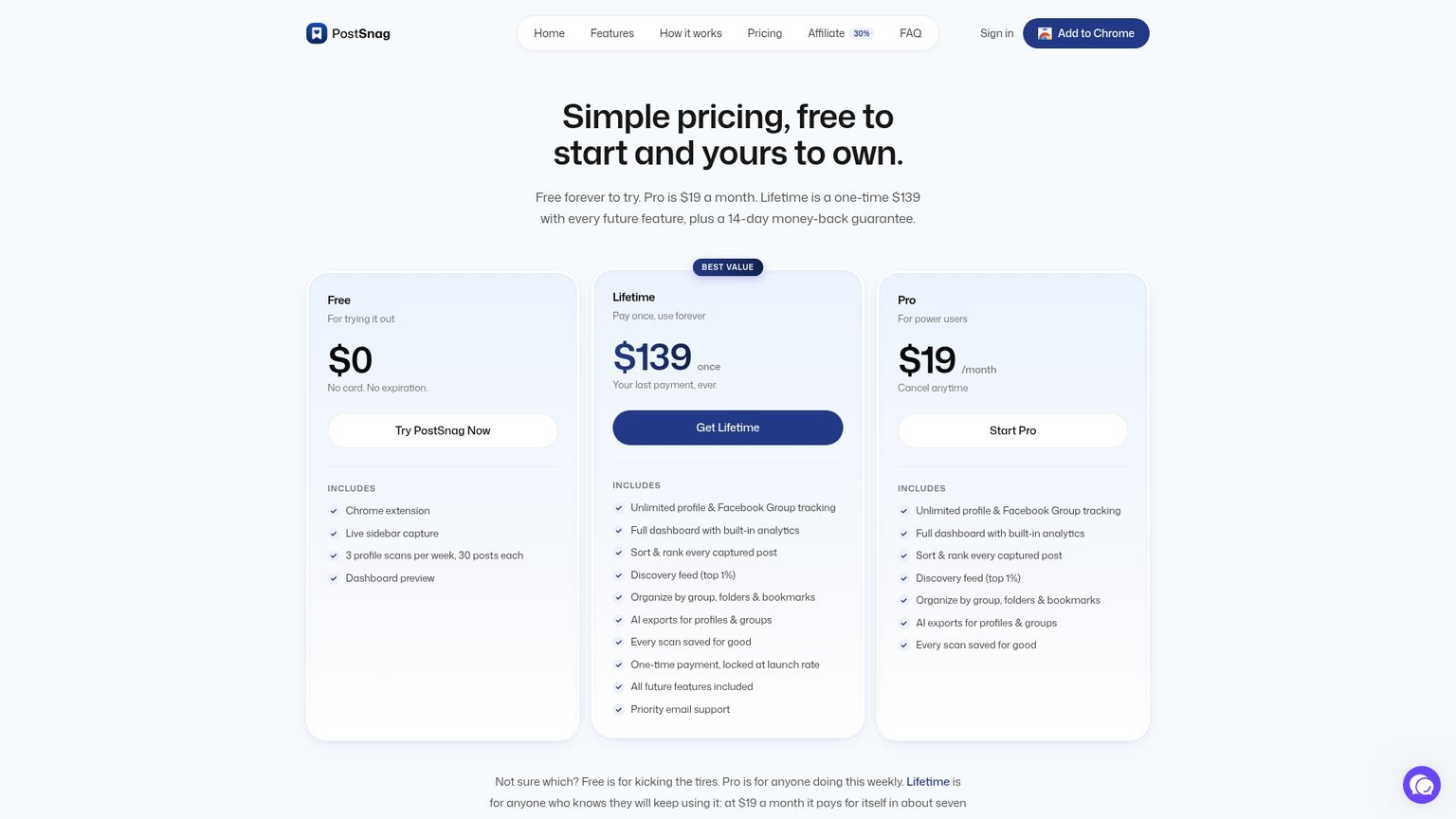
PostSnag costs nothing to start, $19 a month for Pro, or $139 once for Lifetime. Both paid tiers carry a 14-day money-back guarantee, and the free tier never expires. The difference between free and paid is volume: the free plan is a capped trial, and the paid plans remove the limits.
| Plan | Price | What you get | Best for |
|---|---|---|---|
| Free | $0, no card | Extension, live capture, 3 profile scans/week at 30 posts each, dashboard preview | Testing the workflow |
| Pro | $19/month | Unlimited profile & group tracking, full analytics, sort/rank, Discovery feed, AI exports | Anyone researching weekly |
| Lifetime | $139 one-time | Everything in Pro, locked at launch rate, all future features | People sure they’ll keep using it |
The free plan deserves a plain warning: three scans a week at 30 posts each is enough to feel the tool, not to actually work with it. It’s a trial wearing a free-plan badge. The moment you want to track more than a couple of profiles or export real volume, you’re into Pro or Lifetime.
The lifetime math, done honestly: At $19 a month, Lifetime pays for itself in about 7.3 months ($139 ÷ $19). Keep the tool a year and you’ve saved roughly $89 versus Pro. Keep it two years and you’re up $317. So the lifetime deal is straightforward arithmetic if the product survives, which is the real variable. You’re not betting on the price, you’re betting the developer keeps patching it every time Facebook changes its layout. On a tool this young, that’s a genuine unknown.
One more angle worth the comparison. Agencies used to paying $150 to $180 a month for social listening suites that mostly report follower counts will find PostSnag’s lifetime price lands under a single month of those tools. That’s the pitch that lands: turning a normal browsing session into billable research for a one-time $139.
Is PostSnag Safe? The Facebook Account and Privacy Question
PostSnag runs entirely client-side in your own logged-in Facebook session, with no proxies, no burner accounts, and no Facebook API. That design makes it lower-risk than server-side scrapers, which hammer Facebook from outside and trip anti-bot detection. But any Chrome extension that reads your logged-in session carries real privacy considerations, and capturing post data sits in a Facebook Terms of Service gray area.
Two separate risks are worth splitting apart.
Account risk. Because PostSnag only observes what you already see as you scroll normally, it behaves far more like a human than a scraper does. It isn’t sending thousands of automated requests from a data center. That’s the safest architecture a capture tool can have. It is not, however, a guarantee. Facebook’s Terms of Service can frown on programmatic collection of post data regardless of how gently it’s done, so treat heavy, aggressive scanning with the same caution you’d apply to any automation on a platform you don’t want to lose.
Privacy risk. The extension requests permission to read website content and authentication info, which is standard for a tool that has to see Facebook to work, but it’s still access you’re granting. The Chrome Web Store has a documented history of extensions changing hands and later pushing adware. That’s not an accusation against PostSnag, it’s the category risk. Because PostSnag is new, you’re extending trust ahead of a long public track record.
The honest read: the architecture is about as safe as this kind of tool gets, but “safe” here means lower-risk, not zero-risk. If your Facebook account is mission-critical and irreplaceable, weigh that before you scan aggressively.
Is PostSnag Legit? What the Numbers Actually Say
PostSnag is a real, functioning product from a real developer, but its public proof is thin: 181 users on the Chrome Web Store, a single 5.0 rating, and version 1.2.6 last updated in July 2026. It’s legit in the sense that it exists and does what it claims. It’s unproven in the sense that almost nobody has publicly vouched for it yet.
A few things stood out when I dug into the credibility signals.
The homepage testimonials use placeholder stock avatars (the same i.pravatar.cc images anyone can pull), which is a tell. It doesn’t mean the quotes are fake, but at 181 users with one rating, you shouldn’t lean on that social proof to make the call. There are also no independent review videos, no third-party creator demos, and no external write-ups with real screenshots. Right now, most of what exists online about PostSnag is the vendor’s own marketing.
None of that makes it a scam. Plenty of good tools start exactly here: a solo developer, a fresh Chrome Web Store listing, a handful of early users. It just means you’re an early adopter, and you should price that in. Test it free, verify it does what you need on your own accounts, and don’t put a mission-critical workflow on it until you’ve confirmed the data holds up.
PostSnag vs the Alternatives
PostSnag occupies a specific niche: passive, in-Facebook capture of organic posts. Most tools people compare it to actually do a different job. Ad-spy tools show paid creatives. Social listening suites track mentions and sentiment. Scrapers pull data server-side and fight Facebook’s defenses. PostSnag studies organic post performance from inside your own session.
| Tool | What it does | Rough price | vs PostSnag |
|---|---|---|---|
| PostSnag | Captures organic FB posts as you scroll, AI exports | Free / $19-mo / $139 lifetime | The niche pick for organic content research |
| Meta Ad Library | Shows active paid ads for any page | Free | Ads only, no organic posts, no engagement ranking |
| BigSpy / PowerAdSpy | Ad-creative spy databases | $99 to $249/mo | Paid ads, not organic; off-platform dashboards |
| BuzzSumo | Content engagement across the web | $199+/mo | Broader, pricier, weaker on Facebook-specific post capture |
| Apify / PhantomBuster | Server-side scrapers | $30 to $100+/mo + setup | More powerful, more technical, higher account risk |
The takeaway: if you want organic Facebook post research without proxies, code, or a $200 monthly bill, PostSnag is the cleanest option in that lane. If you need paid ad creatives, use the Ad Library or an ad-spy tool. If you need heavy programmatic scraping at scale and can handle the setup and risk, a proper scraper does more.
If your goal is producing content rather than just researching it, PostSnag pairs naturally with the video and community tools we cover elsewhere, like the AI Video Creators community for short-form production or the AI Profit Boardroom for marketing systems. PostSnag finds the winning angles; those cover turning them into posts.
Who Should Use PostSnag (and Who Should Skip It)
PostSnag is built for people who study Facebook content regularly and want to feed it into an AI workflow. It’s not for someone who checks Facebook casually or needs paid-ad intelligence.
Use it if you’re:
- A content creator or marketer who wants a self-updating swipe file of what’s working
- An agency that can bill competitive research and wants it done in minutes, not hours
- Already running an LLM content workflow and want clean data to feed it
Skip it if you’re:
- After paid ad creatives (use Meta Ad Library instead)
- Hoping to pull private groups you’re not a member of (impossible by design)
- Unwilling to risk any friction on a mission-critical Facebook account
- Not going to actually use the AI exports, which is where most of the value lives
How to Set Up PostSnag in Under a Minute
Setting up PostSnag takes about 60 seconds and three steps: install the extension, scroll a profile, and send it to your dashboard. There’s no account creation friction, no API keys, and no proxy configuration to slow you down.
- Install the Chrome extension from the Chrome Web Store. It’s free and requires no card.
- Scroll any Facebook profile, page, or group you can access. PostSnag captures posts as they appear on screen.
- Push the profile to your dashboard, then sort by engagement and export the winners to JSON or Markdown for your AI tool.
On the free plan you get three of these scans a week at 30 posts each, which is enough to run the workflow end to end once or twice and decide if it earns a paid seat.
What a Real PostSnag Workflow Looks Like
The fastest way to see PostSnag’s value is a concrete research loop, not a feature list. Say you want to crack a competitor’s Facebook content in one sitting. Here’s the sequence that turns the tool into an actual output.
First, open the competitor’s page and scroll their recent posts while PostSnag captures in the background. Two minutes of scrolling can pull a whole quarter of their timeline. Next, sort the captured posts by engagement and look only at the top 10. That’s your signal. Ignore the rest. Then export those winners as Markdown and drop them into ChatGPT or Claude with a prompt like “find the common hooks, post formats, and topics in these, and give me 10 post ideas in the same style.”
That single loop replaces what used to be an afternoon of manual scrolling and screenshotting. The Discovery feed then keeps the pattern fresh, surfacing new outliers from every profile you track so you’re not starting from zero next week. It’s the same principle behind any good AI-driven marketing system: capture the raw signal cheaply, then let the model do the pattern-matching.
Key Takeaways
- Pricing: Free to start, $19/month Pro, or $139 one-time Lifetime, both paid tiers with a 14-day refund.
- The real value: AI-ready exports into ChatGPT, Claude, or Gemini, not just the capture itself.
- Biggest limitation: It only grabs what you can already see, so private groups you’re not in stay off-limits.
- The main risk: It’s brand-new (181 users, one rating) and, like every Facebook capture tool, depends on Facebook not breaking its layout.
- What moves the needle: Whether you actually run the exported data through an AI workflow. That’s the difference between a novelty and a research engine.
Related Reading
- PromptWise review: the multi-model AI workspace that turns PostSnag exports into finished content.
- MarketingSecrets.AI alternatives: AI marketing systems for putting research like this to work, priced side by side.
- AI Video Creators community review: where the winning post formats become short-form video.
- AI Profit Boardroom review: a paid community focused on AI-driven marketing workflows.
- AI Agents Course review: for automating the research-to-content loop end to end.
Full pros & cons
- One-click capture while you scroll, with no screenshots or manual saving
- AI-ready JSON, Markdown, and Excel exports that paste into ChatGPT or Claude
- Runs in your own logged-in session with no proxies or burner accounts
- Discovery feed surfaces top-performing posts automatically
- Cheap to try: free to start, $139 one-time lifetime
- Brand-new with only 181 users and a single rating
- Homepage testimonials use stock placeholder avatars
- Free tier is a hard-capped trial (3 scans per week)
- Depends on Facebook not changing its page layout
Try it yourself
Ready to put it to the test?
We may earn a commission at no extra cost to you. Affiliate disclosure.
Frequently Asked Questions
Is PostSnag legit and worth it?
Is PostSnag safe to use on my Facebook account?
How much does PostSnag cost?
Is PostSnag the same as PostSnap?
Reader feedback
Was this review helpful?
Your feedback helps us write better reviews.
Thanks for your feedback.

Ray Okafor is the analyst behind AI Insider Edge, covering AI tools, online courses, and paid communities in the make-money-online space. Hands-on reviews say so and state what was actually paid for access. Research reviews say that too, and are built from the seller’s own public pages, verified member reviews, and the founder’s public record. Either way the aim is a buyer’s-eye read, not a press release. Reviews are independent and may contain affiliate links, at no extra cost to you.
More reviews: AI tools, courses and communities

5 MarketingSecrets.AI Alternatives Under $97/mo (2026)
I priced 5 MarketingSecrets.AI alternatives against its $97/month bill, starting at $19.99/mo. None of them replicate its shared memory across engines.

AI SEO Rainmakers Skool Review: I Paid Charles Floate $269
I joined Charles Floate's AI SEO Rainmakers Skool and paid $269. Here is what is really inside, who it fits, and who should skip it.

AI Mavericks Review 2026: I Pay $7/mo (Worth It?)
I'm a paying AI Mavericks member at $7/month. What's really inside Scott Simson's 494-member Skool, and the catch: the price jumps to $59 after Aug 21.

AI Profit Boardroom Review (2026): 6 Months, $500 In
I've paid over $500 into AI Profit Boardroom since January 2026. The hidden costs, what the workflow vault is really worth, and who should skip it.

AI Video Creators Community Review 2026: I Joined
I joined the AI Video Creators Community after five months inside its bigger rival. What $9/month gets you in Sergey Kabankov's Skool, and how they compare.

AI Video Bootcamp Review: I'm a Level 6 Member (2026)
I'm a Level 6 member of AI Video Bootcamp. What $9/month really buys, the fake-scarcity trick on the sales page, and who should skip it.
The Edge Briefing
One honest review, every Sunday.
One email a week: which AI tools, courses & communities passed the rubric — and which to skip. Built for people funding their own stack.